
STEP 01
Set the stations you can staff
A portrait, interview and detail station are one possible arrangement. Gipper’s guide discusses planning people, locations and a shot list; our rotation is an original example, not a schedule prescribed by that guide.
STEP 02
Balance groups and time blocks
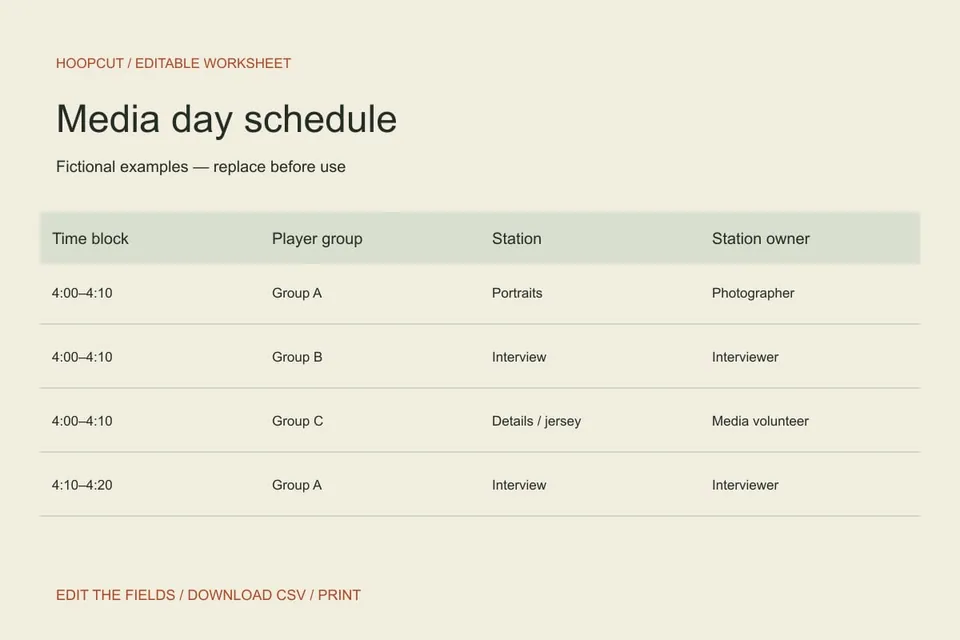
Put each group through each required station once. The sample uses three groups over three ten-minute blocks. Test how long the real tasks take and add setup or catch-up time outside the rotation.
STEP 03
Record what is missing
Give a person responsibility for the completion check. If an athlete arrives late or audio fails, note the missing asset and arrange a catch-up rather than claiming the roster is complete.
Read the example
Group A starts with portraits, then interviews, then details. Groups B and C start elsewhere. Each visits all three stations without being scheduled at two places in the same block.
ILLUSTRATED WALKTHROUGH · 9 SECONDS
Media day schedule
Read the walkthrough transcript
- Choose staffed stations
- Rotate groups through each task
- Track missing assets
Practical questions
Does the sheet check conflicts automatically?
No. It is an editable schedule. Review player groups, staff and station overlap yourself after changes.
Can we run only one station?
Yes. Replace the example with sequential groups and realistic timing for your available staff.
Are these additional Hoopcut app features?
These are free browser planning and design resources. Hoopcut’s app focuses on basketball auto clipping and Shot Tracer. The editor does not upload video or publish to a social account.
Source notes
The template, example data and workflow are original editorial resources. Local organization rules in a source are not universal requirements.