
STEP 01
Confirm the event window
Ask the organizer where the segment fits relative to the game. Work backward from that real window rather than assuming the sample total is available.
STEP 02
Proof names and speaking cues
Assign one owner to the roster and another to the microphone sequence when appropriate. Put pronunciation reminders in the notes column and check them with the people concerned.
STEP 03
Rehearse the transition
Walk through how players arrive, where gifts are handed over and how the segment ends. A printed cue sheet can help staff recover if a speaker is absent or a media file fails.
Read the example
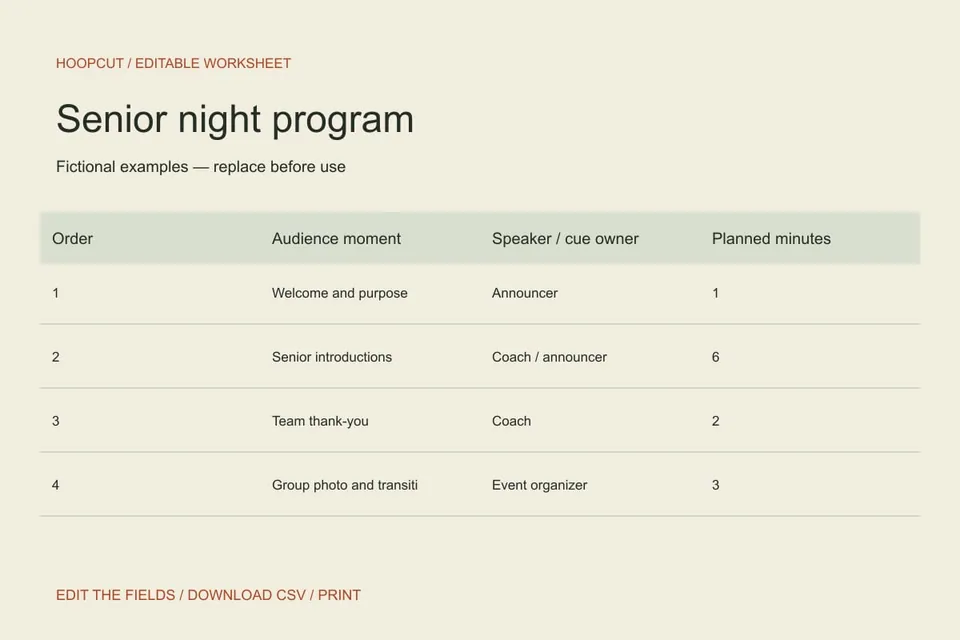
The four sample moments form a short recognition segment. They do not include a meal or full banquet agenda, which belongs to a separate team event.
ILLUSTRATED WALKTHROUGH · 9 SECONDS
Senior night program
Read the walkthrough transcript
- Set the confirmed event window
- Assign speaking cues
- Print the working program
Practical questions
Is this a designed booklet?
It is an editable run-of-show sheet with a print view and CSV export. Use the data in another design tool if you need a folded booklet.
Can I add every senior separately?
Yes. Add one row per introduction and check that the total fits the confirmed window.
Are these additional Hoopcut app features?
These are free browser planning and design resources. Hoopcut’s app focuses on basketball auto clipping and Shot Tracer. The editor does not upload video or publish to a social account.