
STEP 01
Count recipients and items separately
A group of ten seniors may need twenty cards but only one shared display. Set quantity for each item rather than multiplying the entire event budget by the roster size.
STEP 02
Enter actual quotes
Use the unit price and separate extras such as setup or shipping. Enter tax as an extra line or extra cost when applicable. The calculator does not fetch prices or calculate tax rates.
STEP 03
Agree the total before collecting money
Check the combined amount with the organizer and record an owner. Replace assumptions before ordering. Keep optional individual gifts separate from a shared team commitment.
Read the example
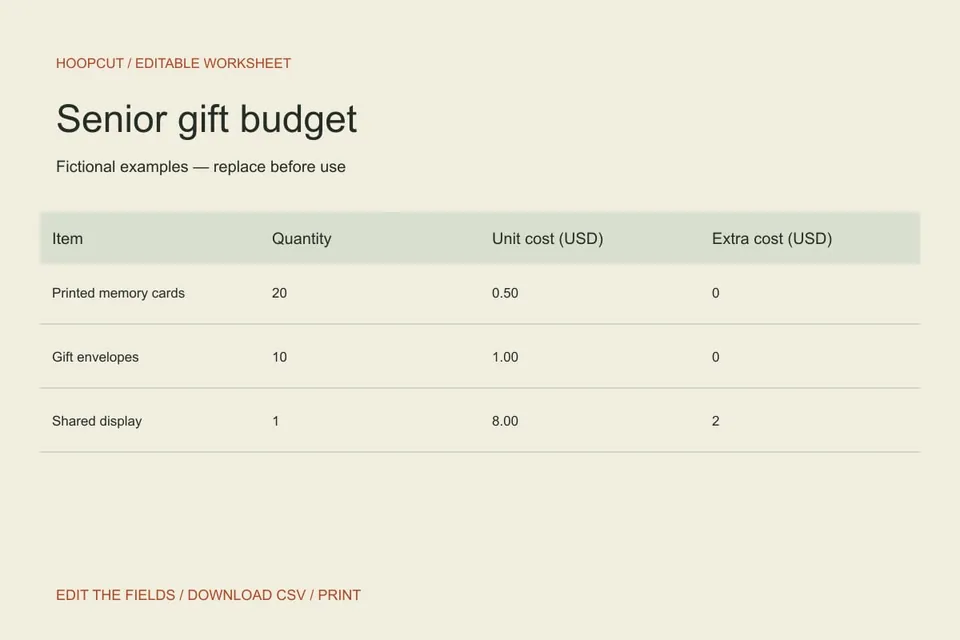
The sample combines 20 cards at $0.50, 10 envelopes at $1.00 and one $8 display with $2 extra. The arithmetic total is $30.00; all amounts are fictional.
ILLUSTRATED WALKTHROUGH · 9 SECONDS
Senior gift budget
Read the walkthrough transcript
- Count the items
- Replace example costs
- Review the calculated total
Practical questions
What formula does the calculator use?
Each line is quantity × unit cost + extra cost. The grand total adds the line totals. Blank numeric cells count as zero; invalid or negative inputs must be corrected.
Can I use another currency?
This version labels amounts USD and does not convert currencies. Use consistent units and relabel the downloaded sheet yourself if planning in another currency.
Are these additional Hoopcut app features?
These are free browser planning and design resources. Hoopcut’s app focuses on basketball auto clipping and Shot Tracer. The editor does not upload video or publish to a social account.